
Toyota Yaris: Bluetooth® / Bluetooth® Audio
- Applicable Bluetooth® specification (Recommended)
Ver. 1.1/1.2/2.0 + EDR/2.1 + EDR/3.0 (conformity)
- Response profile
- A2DP (Advanced Audio Distribution Profile) Ver. 1.0/1.2
- AVRCP (Audio/Video Remote Control Profile) Ver. 1.0/1.3/1.4
A2DP is a profile which transmits only audio to the Bluetooth® unit. If your Bluetooth® audio device corresponds only to A2DP, but not AVRCP, you cannot operate it using the control panel of the vehicle’s audio system. In this case, only the operations on the mobile device are available the same as when a portable audio device for a noncompliant Bluetooth® device is connected to the AUX terminal.
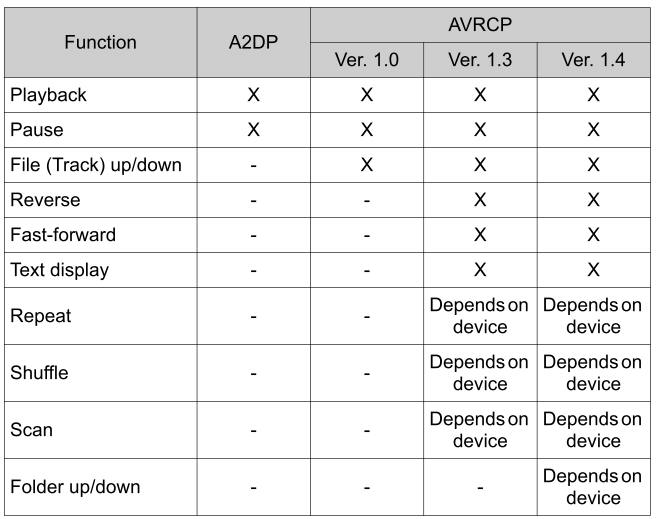
X : Available
- : Not available
- The battery consumption of Bluetooth® audio devices increases while Bluetooth® is connected.
- If a general mobile phone device is USB connected during music playback over the Bluetooth® connection, the Bluetooth® connection is disconnected.
- For this reason, you cannot have music playback over a Bluetooth® connection and music playback using a USB connection at the same time.
- If a device which supports AVRCP Ver. 1.6 or higher is connected, song information may not display correctly.
- The system may not operate normally depending on the Bluetooth® audio device.
- How to Use the Bluetooth® Audio System
- Bluetooth® Audio Device Information Display
- How to Use Pandora® (if equipped)
- How to Use Aha™
- How to Use Stitcher™ Radio
 Communication Settings
Select the icon on the home
screen and display the Communication screen. Select
to change the setting.
* 1: Depending on the device, it may be necessary to acquire
download permission on the device side...
 How to Use the Bluetooth® Audio System
Switching to Bluetooth® audio mode
To listen to music or voice audio recorded to a Bluetooth® audio
device, switch to the Bluetooth® audio mode to operate the audio
device using the audio system control panel...
Other information:
Toyota Yaris XP210 (2020-2026) Owner's Manual: Traction Control System (TCS)
The Traction Control System (TCS) enhances traction and safety by controlling engine torque and braking. When the TCS detects driving wheel slippage, it lowers engine torque and operates the brakes to prevent loss of traction. This means that on a slick surface, the engine adjusts automatically to provide optimum power to the drive wheels, limiting wheel spin and loss of traction...
Toyota Yaris XP210 (2020-2026) Reapir and Service Manual: Lost Communication With Brake System Control Module(ch2) Missing Message (U117087)
DESCRIPTION The brake actuator assembly communicates with the ECM and engine stop and start ECU. When the brake actuator assembly does not receive data from the engine stop and start ECU, the engine stop and start ECU stores DTC U117087. DTC No. Detection Item DTC Detection Condition Trouble Area DTC Output from U117087 Lost Communication With Brake System Control Module(ch2) Missing Message No communication from the brake actuator assembly continues...
Categories
- Manuals Home
- Toyota Yaris Owners Manual
- Toyota Yaris Service Manual
- Maintenance
- Engine & Hybrid System
- Headlights
- New on site
- Most important about car
Refueling
Before refueling, close all the doors, windows, and the liftgate/trunk lid, and switch the ignition OFF.
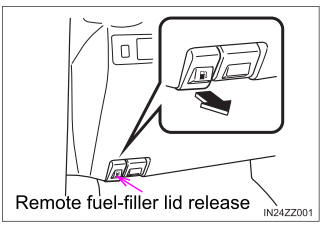
To open the fuel-filler lid, pull the remote fuel-filler lid release.

Copyright © 2026 www.toyaris4.com