
Toyota Yaris: Lin Communication System / System Diagram
SYSTEM DIAGRAM
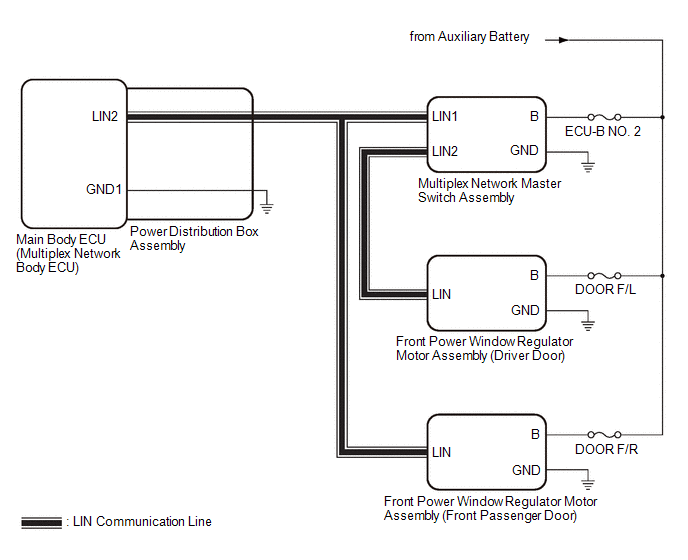
CERTIFICATION BUS LINES
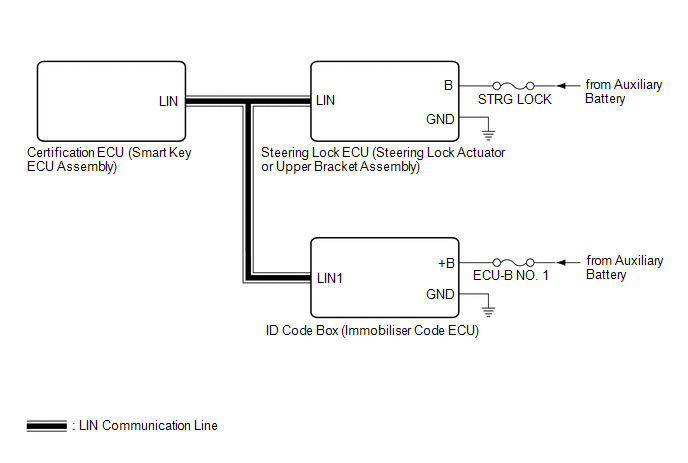
 Parts Location
PARTS LOCATION ILLUSTRATION
*1 FRONT POWER WINDOW REGULATOR MOTOR ASSEMBLY (DRIVER DOOR) *2 FRONT POWER WINDOW REGULATOR MOTOR ASSEMBLY (FRONT PASSENGER DOOR) ILLUSTRATION
*1 MULTIPLEX NETWORK MASTER SWITCH ASSEMBLY *2 POWER DISTRIBUTION BOX ASSEMBLY - DOOR F/R FUSE - DOOR F/L FUSE - DOOR R/L FUSE - DOOR R/R FUSE - STRG LOCK FUSE - ECU-B NO...
 System Description
SYSTEM DESCRIPTION LIN COMMUNICATION SYSTEM DESCRIPTION The LIN communication system is used for communication between the components in the tables below...
Other information:
Toyota Yaris XP210 (2020-2026) Reapir and Service Manual: MIL Circuit
DESCRIPTION The Malfunction Indicator Lamp (MIL) is used to indicate vehicle malfunctions detected by the ECM. The MIL operation can be checked visually. When the ignition switch is first turned to ON, the MIL should be illuminated and should then turn off after the engine is started...
Toyota Yaris XP210 (2020-2026) Owner's Manual: Tiedown Hook-Front
Remove the tiedown eyelet and the lug wrench from the luggage compartment. Wrap a jack lever or similar tool with a soft cloth to prevent damage to a painted bumper, and open the cap located on the front bumper.Remove the cap completely and store it so as not to lose it...
Categories
- Manuals Home
- Toyota Yaris Owners Manual
- Toyota Yaris Service Manual
- Diagnostic Trouble Code Chart
- Fuse Panel Description
- Engine Start Function When Key Battery is Dead
- New on site
- Most important about car
Keys
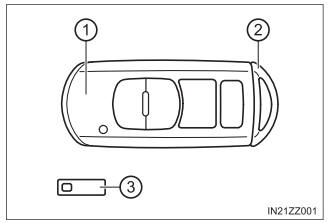
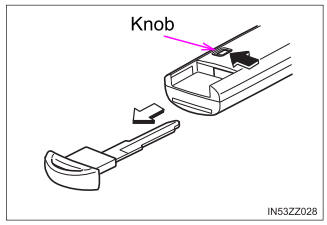
To use the auxiliary key, press the knob and pull out the auxiliary key from the smart key.

Copyright © 2026 www.toyaris4.com