
Toyota Yaris: Charging System / Dtc Check / Clear
DTC CHECK / CLEAR
CHECK DTC
(a) Connect the GTS to the DLC3.
(b) Turn the ignition switch to ON.
(c) Turn the GTS on.
(d) Enter the following menus: Powertrain / Engine / Trouble Codes.
(e) Check for DTCs, and then write them down.
(f) Check the details of the DTCs.
Click here

CLEAR DTC
(a) Connect the GTS to the DLC3.
(b) Turn the ignition switch to ON.
(c) Turn the GTS on.
(d) Enter the following menus: Powertrain / Engine / Trouble Codes.
(e) Clear the DTCs.
Powertrain > Engine > Clear DTCs Diagnosis System
DIAGNOSIS SYSTEM DLC3 (Data Link Connector 3) (a) Check the DLC3. Click here
HINT: If the voltage is below 11 V, replace or recharge the auxiliary battery...
 Freeze Frame Data
FREEZE FRAME DATA DESCRIPTION The ECM records vehicle and driving condition information as freeze frame data the moment a DTC is stored. When troubleshooting, freeze frame data can be helpful in determining whether the vehicle was moving or stationary, whether the engine was warmed up or not, whether the air fuel ratio was lean or rich, as well as other data recorded at the time of a malfunction...
Other information:
Toyota Yaris XP210 (2020-2026) Owner's Manual: Tires
For reasons of proper performance, safety, and better fuel economy, always maintain recommended tire inflation pressures and stay within the recommended load limits and weight distribution. WARNING Using Different Tire Types Driving your vehicle with different types of tires is dangerous...
Toyota Yaris XP210 (2020-2026) Reapir and Service Manual: Problem Symptoms Table
PROBLEM SYMPTOMS TABLE NOTICE: If the main body ECU (multiplex network body ECU) is replaced, refer to the Registration. Click here HINT: Use the table below to help determine the cause of problem symptoms. If multiple suspected areas are listed, the potential causes of the symptoms are listed in order of probability in the "Suspected Area" column of the table...
Categories
- Manuals Home
- Toyota Yaris Owners Manual
- Toyota Yaris Service Manual
- Headlights
- G16e-gts (engine Mechanical)
- Fuel Gauge
- New on site
- Most important about car
Refueling
Before refueling, close all the doors, windows, and the liftgate/trunk lid, and switch the ignition OFF.
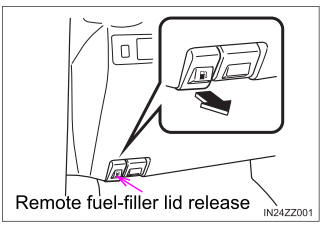
To open the fuel-filler lid, pull the remote fuel-filler lid release.

Copyright © 2026 www.toyaris4.com