
Toyota Yaris: AUX/USB mode / How to connect USB port/Auxiliary jack
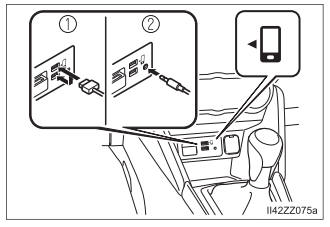
- USB port
- Auxiliary jack
Connecting a device
Connect the connector on the device to the USB port.
Connecting with a connector cable
Connect the device plug/connector cable to the auxiliary jack/USB port.
- Insert the plug into the auxiliary jack/USB port securely.
- Insert or pull out the plug with the plug perpendicular to the auxiliary jack/USB port hole.
- Insert or remove the plug by holding its base.
- Use the USB terminal indicated by the
 mark when using Apple CarPlay™
and Android Auto™.
mark when using Apple CarPlay™
and Android Auto™.
WARNING
Do not allow the connection plug cord to get tangled with the parking brake or the shift lever
Allowing the plug cord to become tangled with the parking brake or the shift lever is dangerous as it could interfere with driving, resulting in an accident.
NOTICE
Do not place objects or apply force to the auxiliary jack/USB port with the plug connected.
 AUX/USB mode
Audio can be heard from the vehicle’s speakers by connecting a
commercially-available portable audio unit to the auxiliary jack.
A commercially-available, non-impedance (3...
 How to use AUX mode
Select the icon on the home
screen and display the Entertainment screen.
Select to switch to the AUX
mode. The following icons are displayed in the lower part of the center display...
Other information:
Toyota Yaris XP210 (2020-2026) Reapir and Service Manual: Starter Exceed Limited Number (P154563)
DESCRIPTION When the number of starter operations reaches the maximum number, the engine stop and start ECU stores DTC P154563 and blinks the stop and start cancel indicator. DTC No. Detection Item DTC Detection Condition Trouble Area Warning Indicate Memory Note P154563 Starter Exceed Limited Number Both of the following conditions are met (1 trip detection logic): Ignition switch ON...
Toyota Yaris XP210 (2020-2026) Reapir and Service Manual: Removal
REMOVAL PROCEDURE 1. REMOVE CENTER LOWER INSTRUMENT COVER Click here 2. REMOVE LOWER INSTRUMENT PANEL FINISH PANEL Click here 3. REMOVE SWITCH HOLE BASE SUB-ASSEMBLY Click here 4. REMOVE SHIFT LEVER KNOB SUB-ASSEMBLY Click here 5. REMOVE CONSOLE BOX ASSEMBLY Click here 6...
Categories
- Manuals Home
- Toyota Yaris Owners Manual
- Toyota Yaris Service Manual
- Removal
- Engine & Hybrid System
- Diagnostic Trouble Code Chart
- New on site
- Most important about car
Fuel-Filler Lid and Cap
WARNING
When removing the fuel-filler cap, loosen the cap slightly and wait for any hissing to stop, then remove it
Fuel spray is dangerous. Fuel can burn skin and eyes and cause illness if ingested. Fuel spray is released when there is pressure in the fuel tank and the fuel-filler cap is removed too quickly.
