
Toyota Yaris: Can Communication System / Utility
UTILITY
INITIALIZE THE CONNECTION INFORMATION OF A GATEWAY FUNCTION EQUIPPED ECU (BUS MONITOR ECU)
(a) Initialize the ECU.
Body Electrical > Central Gateway > Utility| Tester Display |
|---|
| Initialization |
| Tester Display |
|---|
| Initialization |
 How To Proceed With Troubleshooting
CAUTION / NOTICE / HINT NOTICE:
Because the order of diagnosis is important to allow correct diagnosis, make sure to begin troubleshooting using How to Proceed with Troubleshooting when CAN communication system related DTCs are output...
 Terminals Of Ecu
TERMINALS OF ECU NOTICE:
After turning the ignition switch off, waiting time may be required before disconnecting the cable from the negative (-) auxiliary battery terminal...
Other information:
Toyota Yaris XP210 (2020-2026) Reapir and Service Manual: Installation
INSTALLATION PROCEDURE 1. INSTALL STOP LIGHT SWITCH MOUNTING ADJUSTER (a) Engage the claws to install a new stop light switch mounting adjuster. 2. INSTALL STOP LIGHT SWITCH ASSEMBLY (a) Insert the stop light switch assembly to the stop light switch mounting adjuster until the switch body slightly touches the brake pedal...
Toyota Yaris XP210 (2020-2026) Reapir and Service Manual: Installation
INSTALLATION PROCEDURE 1. INSTALL HORN BUTTON ASSEMBLY (a) Check that the ignition switch is off. (b) Check that the cable is disconnected from the negative (-) auxiliary battery terminal. CAUTION: Wait at least 90 seconds after disconnecting the cable from the negative (-) auxiliary battery terminal to disable the SRS system...
Categories
- Manuals Home
- Toyota Yaris Owners Manual
- Toyota Yaris Service Manual
- Fuel Gauge
- Power Integration No.1 System Missing Message (B235287,B235587,B235787-B235987)
- Diagnostic Trouble Code Chart
- New on site
- Most important about car
Keys
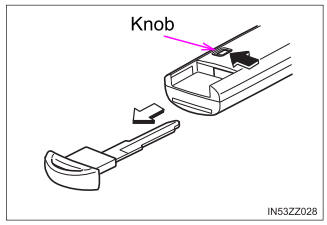
To use the auxiliary key, press the knob and pull out the auxiliary key from the smart key.

Copyright © 2026 www.toyaris4.com