Toyota Yaris: Audio / Video / Active Noise Control Microphone
Components
COMPONENTS
ILLUSTRATION
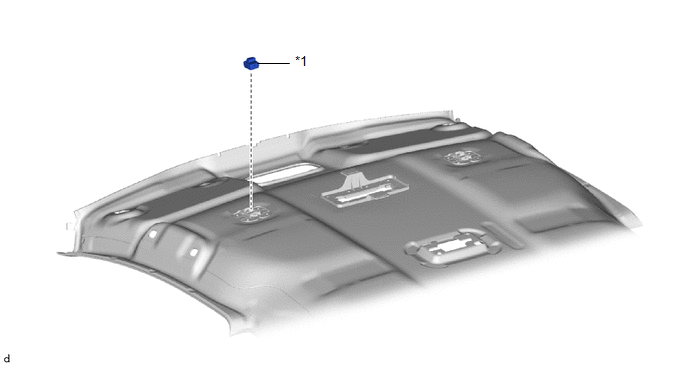
| *1 | ACTIVE NOISE CONTROL MICROPHONE | - | - |
Removal
REMOVAL
CAUTION / NOTICE / HINT
HINT:
-
When the cable is disconnected / reconnected to the auxiliary battery terminal, systems temporarily stop operating. However, each system has a function that completes learning the first time the system is used.
-
Learning completes when vehicle is driven
Effect/Inoperative Function When Necessary Procedures are not Performed
Necessary Procedures
Link
Lane tracing assist system
Drive the vehicle straight ahead at 35 km/h (22 mph) or more for 5 second or more.

Pre-collision system
Stop and start system
Drive the vehicle until stop and start control is permitted (approximately 5 to 60 minutes)

-
Learning completes when vehicle is operated normally
Effect/Inoperative Function When Necessary Procedures are not Performed
Necessary Procedures
Link
Power door lock control system
- Back door opener
Perform door unlock operation with door control switch or electrical key transmitter sub-assembly switch.

Air conditioning system
After the ignition switch is turned to ON, the servo motor standard position is recognized.
-
-
Learning completes when vehicle is driven
- Use the same procedure for the RH and LH sides.
- The procedure listed below is for the LH side.
PROCEDURE
1. REMOVE ROOF HEADLINING ASSEMBLY
Click here

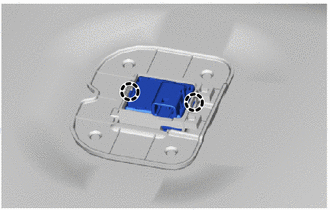
2. REMOVE ACTIVE NOISE CONTROL MICROPHONE
| (a) Disengage the claws to remove the active noise control microphone. |
|
Installation
INSTALLATION
CAUTION / NOTICE / HINT
HINT:
- Use the same procedure for the RH and LH sides.
- The procedure listed below is for the LH side.
PROCEDURE
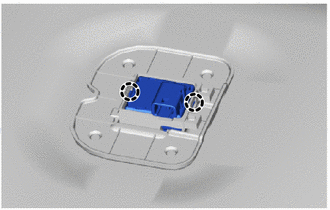
1. INSTALL ACTIVE NOISE CONTROL MICROPHONE
| (a) Engage the claws to install the active noise control microphone. |
|
2. INSTALL ROOF HEADLINING ASSEMBLY
Click here

 Installation
INSTALLATION PROCEDURE 1. INSTALL NO. 2 EQUALIZER STEREO COMPONENT BRACKET (a) Engage the guides to install the No. 2 equalizer stereo component bracket...

Other information:
Toyota Yaris XP210 (2020-2026) Reapir and Service Manual: Components
C..
Toyota Yaris XP210 (2020-2026) Reapir and Service Manual: Turbocharger/Supercharger Wastegate Solenoid "A" Circuit Open (P024313)
DESCRIPTION The waste gate valve is built into the turbine housing and is operated by the vacuum regulating valve assembly. The ECM uses duty control to open and close the vacuum regulating valve assembly. The amount of opening is controlled according to the operation status...
Categories
- Manuals Home
- Toyota Yaris Owners Manual
- Toyota Yaris Service Manual
- Fuse Panel Description
- Power Integration No.1 System Missing Message (B235287,B235587,B235787-B235987)
- Removal
- New on site
- Most important about car
Keys
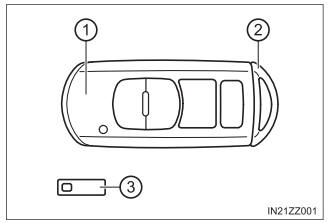
To use the auxiliary key, press the knob and pull out the auxiliary key from the smart key.