
Toyota Yaris: Back Door Outside Garnish / Installation
INSTALLATION
PROCEDURE
1. INSTALL BACK DOOR OUTSIDE GARNISH SUB-ASSEMBLY
(a) Engage the clips to install the back door outside garnish sub-assembly as shown in the illustration.
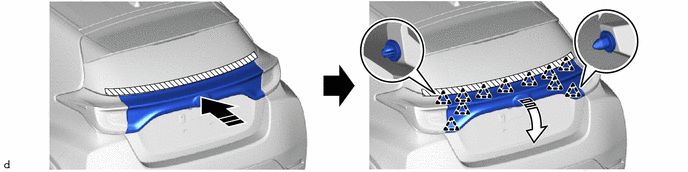
.png) | 0 Install in this Direction (1) |
.png) | Install in this Direction (2) |
(b) Install the 4 bolts.
Torque:
4.9 N·m {50 kgf·cm, 43 in·lbf}
(c) Remove the protective tape.
2. INSTALL BACK DOOR TRIM COVER
Click here
.gif)
3. INSTALL BACK DOOR TRIM BOARD
Click here
 Reassembly
R..
 Front Bumper
..
Other information:
Toyota Yaris XP210 (2020-2026) Reapir and Service Manual: Lost Communication With Brake System Control Module(ch2) Missing Message (U117087)
DESCRIPTION The brake actuator assembly communicates with the ECM and engine stop and start ECU. When the brake actuator assembly does not receive data from the engine stop and start ECU, the engine stop and start ECU stores DTC U117087. DTC No. Detection Item DTC Detection Condition Trouble Area DTC Output from U117087 Lost Communication With Brake System Control Module(ch2) Missing Message No communication from the brake actuator assembly continues...
Toyota Yaris XP210 (2020-2026) Reapir and Service Manual: Components
COMPONENTS ILLUSTRATION *1 FRONT FLOOR COVER LH *2 FRONT FLOOR COVER RH *3 FRONT NO. 1 FLOOR HEAT INSULATOR SUB-ASSEMBLY - - N*m (kgf*cm, ft.*lbf): Specified torque - - ILLUSTRATION *1 PROPELLER SHAFT WITH CENTER BEARING ASSEMBLY *2 CENTER NO...
Categories
- Manuals Home
- Toyota Yaris Owners Manual
- Toyota Yaris Service Manual
- How to connect USB port/Auxiliary jack
- G16e-gts (engine Mechanical)
- Auto Lock/Unlock Function
- New on site
- Most important about car
Turning the Engine Off
Stop the vehicle completely. Manual transaxle: Shift into neutral and set the parking brake.Automatic transaxle: Shift the selector lever to the P position and set the parking brake.
Press the push button start to turn off the engine. The ignition position is off.
Copyright © 2026 www.toyaris4.com