Toyota Yaris: Mass Air Flow Meter / Inspection
INSPECTION
PROCEDURE
1. INSPECT MASS AIR FLOW METER
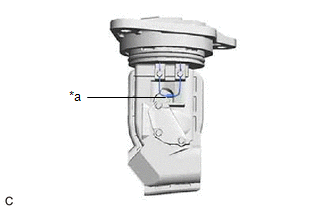
| (a) Perform a visual check for any foreign matter on the temperature sensor (thermistor) of the mass air flow meter shown in the illustration. OK: There is no foreign matter. If the result is not as specified, replace the mass air flow meter. |
|
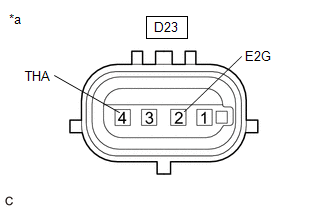
| (b) Measure the resistance according to the value(s) in the table below. Standard Resistance:
If the result is not as specified, replace the mass air flow meter. |
|
 Removal
REMOVAL CAUTION / NOTICE / HINT The necessary procedures (adjustment, calibration, initialization, or registration) that must be performed after parts are removed, installed, or replaced during the mass air flow meter removal/installation are shown below...
 Installation
INSTALLATION PROCEDURE 1. INSTALL MASS AIR FLOW METER (a) Install the mass air flow meter to the air cleaner cap sub-assembly with the 2 screws. NOTICE:
If the mass air flow meter has been struck or dropped, replace it...
Other information:
Toyota Yaris XP210 (2020-2026) Reapir and Service Manual: No Cool Air Comes Out
DESCRIPTION If warm air blows from the registers regardless of the temperature setting of the air conditioning system, the following factors may be the cause. Symptom Factor No cool air comes out (Blower control is normal) Compressor with pulley assembly malfunction Refrigerant pressure is extremely high or low Refrigerant volume (low) Clogged cooler condenser assembly fins Cooling fan system malfunction Mechanical locking of damper and damper link No...
Toyota Yaris XP210 (2020-2026) Reapir and Service Manual: Dtc Check / Clear
DTC CHECK / CLEAR DTC CHECK (a) Check for DTC(s). Chassis > Four Wheel Drive > Trouble Codes (b) Check the details of the DTCs. NOTICE: Make sure to clear the DTCs after repair. Display Item Description Test Failed Shows the malfunction judgment results during the current trip...
Categories
- Manuals Home
- Toyota Yaris Owners Manual
- Toyota Yaris Service Manual
- Maintenance
- Engine Start Function When Key Battery is Dead
- To Set Speed
- New on site
- Most important about car
Keys
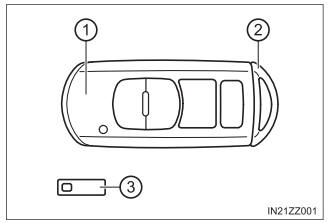
To use the auxiliary key, press the knob and pull out the auxiliary key from the smart key.