
Toyota Yaris: Smart Key System (for Start Function) / Dtc Check / Clear
DTC CHECK / CLEAR
NOTICE:
- When DTC is output, be sure to confirm and record.
- DTCs may have been stored due to problems unrelated to the steering lock function. Be sure to confirm and record any DTCs output for other systems.
- When using the GTS with the ignition switch off, connect the GTS to the DLC3 and turn a courtesy light switch on and off at intervals of 1.5 seconds or less until communication between the GTS and the vehicle begins. Then select the vehicle type under manual mode and enter the following menus: Body Electrical / Smart Key. While using the GTS, periodically turn a courtesy light switch on and off at intervals of 1.5 seconds or less to maintain communication between the GTS and the vehicle.
- The steering lock ECU (steering lock actuator or upper bracket assembly) does not store history DTCs. If any DTCs are output, confirm and record them as soon as possible. Do not turn the ignition switch off or clear the DTCs until the DTCs are confirmed and recorded.
CHECK FOR DTC
(a) Enter the following menus.
Body Electrical > Smart Key > Trouble Codes(b) Enter the following menus.
Body Electrical > Power Source Control > Trouble Codes(c) Enter the following menus.
Powertrain > Engine > Trouble Codes(d) Check for DTCs.
Click here

HINT:
- The steering lock system DTCs are output from the steering lock ECU (steering lock actuator or upper bracket assembly) via the certification ECU (smart key ECU assembly).
-
When any DTC is not output and security indicator light does not blink, problems may be caused by the following:
- Open in TC circuit between DLC3 connector and related ECU
- Malfunction of related ECU
CLEAR DTC
(a) Enter the following menus.
Body Electrical > Smart Key > Clear DTCs(b) Enter the following menus.
Body Electrical > Power Source Control > Clear DTCs(c) Enter the following menus.
Powertrain > Engine > Clear DTCs(d) Clear the DTCs.
 Terminals Of Ecu
TERMINALS OF ECU CHECK CERTIFICATION ECU (SMART KEY ECU ASSEMBLY)
(a) Disconnect the H45 and H46 certification ECU (smart key ECU assembly) connectors...
 Data List / Active Test
DATA LIST / ACTIVE TEST DATA LIST NOTICE:
In the table below, the values listed under "Normal Condition" are reference values. Do not depend solely on these reference values when deciding whether a part is faulty or not...
Other information:
Toyota Yaris XP210 (2020-2026) Reapir and Service Manual: Left Front Wheel Speed Sensor Signal Stuck Low (C050023)
DESCRIPTION Refer to DTC C05001F. Click here DTC No. Detection Item DTC Detection Condition Trouble Area DTC Output from C050023 Left Front Wheel Speed Sensor Signal Stuck Low Any of the following is detected: When the +BS terminal voltage is 17...
Toyota Yaris XP210 (2020-2026) Reapir and Service Manual: Components
COMPONENTS ILLUSTRATION *1 NO. 1 ENGINE UNDER COVER ASSEMBLY - - N*m (kgf*cm, ft.*lbf): Specified torque - - ILLUSTRATION *1 WATER GUARD PLATE RH *2 NO. 1 FRONT VENTILATOR SEAL *3 OUTER COWL TOP PANEL SUB-ASSEMBLY - - N*m (kgf*cm, ft...
Categories
- Manuals Home
- Toyota Yaris Owners Manual
- Toyota Yaris Service Manual
- How to connect USB port/Auxiliary jack
- Power Integration No.1 System Missing Message (B235287,B235587,B235787-B235987)
- Immobilizer System
- New on site
- Most important about car
Keys
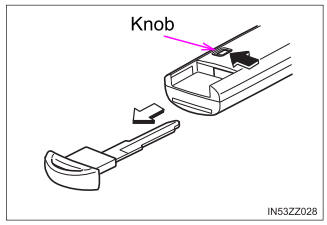
To use the auxiliary key, press the knob and pull out the auxiliary key from the smart key.

Copyright © 2026 www.toyaris4.com