Toyota Yaris: Rear Axle Hub / Removal
REMOVAL
CAUTION / NOTICE / HINT
HINT:
- Use the same procedure for the RH side and LH side.
- The following procedure is for the LH side.
PROCEDURE
1. REMOVE REAR WHEEL
Click here

2. REMOVE REAR AXLE SHAFT NUT
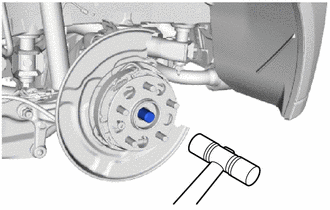
| (a) Using SST and a hammer, release the staked part of the rear axle shaft nut. SST: 09930-00010 NOTICE: Loosen the staked part of the rear axle shaft nut completely, otherwise the threads of the rear drive shaft assembly may be damaged. |
|
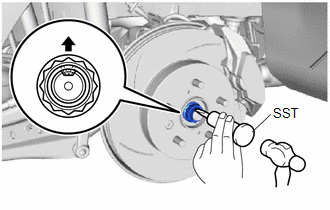
(b) While applying the brakes, remove the rear axle shaft nut.
3. SEPARATE REAR DISC BRAKE CALIPER ASSEMBLY
Click here

4. REMOVE PARKING BRAKE SHOE ADJUSTING HOLE PLUG
Click here

5. REMOVE REAR DISC
Click here

6. DISCONNECT REAR SPEED SENSOR
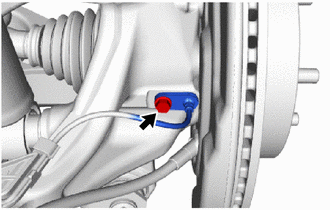
| (a) Remove the bolt and rear speed sensor from the rear axle carrier sub-assembly. NOTICE:
|
|
7. REMOVE REAR AXLE HUB AND BEARING ASSEMBLY
| (a) Put matchmarks on the rear drive shaft assembly and the rear axle hub and bearing assembly. |
|
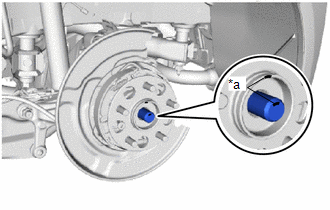
| (b) Using a plastic hammer, separate the rear drive shaft assembly from the rear axle hub and bearing assembly. NOTICE:
HINT: If it is difficult to separate the rear drive shaft assembly rear axle hub and bearing assembly, tap the end of the rear drive shaft assembly using a brass bar and a hammer. |
|
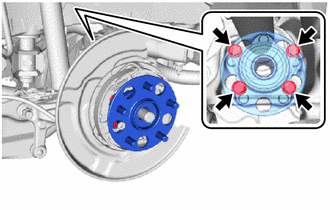
| (c) Remove the 4 bolts, rear axle hub and bearing assembly from the rear axle carrier sub-assembly. |
|
 On-vehicle Inspection
ON-VEHICLE INSPECTION CAUTION / NOTICE / HINT HINT:
Use the same procedure for the RH side and LH side.
The following procedure is for the LH side...
 Installation
INSTALLATION CAUTION / NOTICE / HINT HINT:
Use the same procedure for the RH side and LH side.
The following procedure is for the LH side.
PROCEDURE 1...
Other information:
Toyota Yaris XP210 (2020-2026) Reapir and Service Manual: Components
C..
Toyota Yaris XP210 (2020-2026) Reapir and Service Manual: Components
COMPONENTS ILLUSTRATION *1 COVER AND DISC CLUTCH SET *2 MANUAL TRANSAXLE ASSEMBLY *3 CLUTCH RELEASE CYLINDER WITH BEARING ASSEMBLY *4 CLUTCH TUBE BOOT *5 CLUTCH RELEASE CYLINDER TO BLEEDER TUBE *6 CLUTCH RELEASE BLEEDER SUB-ASSEMBLY *7 BLEEDER CLUTCH RELEASE TUBE *8 CLAMP *9 CLUTCH RELEASE BEARING PLATE - - Tightening torque for "Major areas involving basic vehicle performance such as moving/turning/stopping": N*m (kgf*cm, ft...
Categories
- Manuals Home
- Toyota Yaris Owners Manual
- Toyota Yaris Service Manual
- Brake System Control Module "A" System Voltage System Voltage Low (C137BA2)
- Diagnostic Trouble Code Chart
- Removal
- New on site
- Most important about car
Fuel Gauge
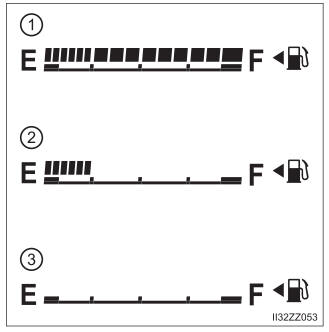
The fuel gauge shows approximately how much fuel is remaining in the tank when the ignition is switched ON. We recommend keeping the tank over 1/4 full.