Toyota Yaris: Front Speed Sensor / Removal
REMOVAL
CAUTION / NOTICE / HINT
HINT:
- Use the same procedure for the RH side and LH side.
- The following procedure is for the LH side.
- The front speed sensor rotor is a component of the front axle hub sub-assembly. If the front speed sensor rotor is malfunctioning, replace the front axle hub sub-assembly.
PROCEDURE
1. REMOVE FRONT WHEEL
Click here

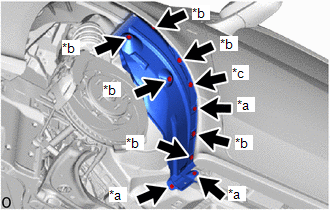
2. SEPARATE FRONT FENDER LINER
| (a) Remove the 6 clips, 3 screws and grommet to separate the front fender liner. |
|
3. REMOVE FRONT SPEED SENSOR
(a) Turn back the front fender liner.
| (b) Disconnect the connector. |
|
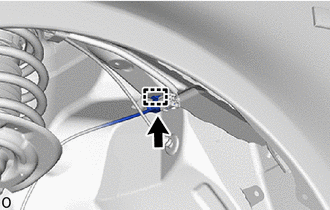
(c) Disengage the clamp from the vehicle body.
| (d) Disengage the 4 clamps from the vehicle body. |
|
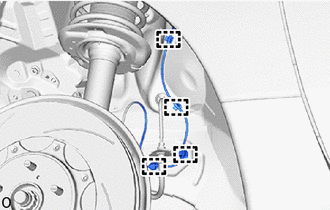
| (e) Remove the bolt and hook to separate the front speed sensor. |
|
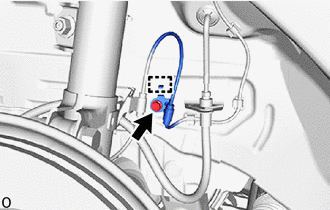
| (f) Remove the bolt and separate the front flexible hose and front speed sensor clamp from the front shock absorber assembly. |
|
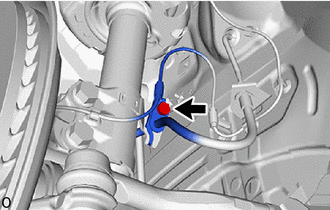
| (g) Disengage the clamp from the front shock absorber assembly. |
|
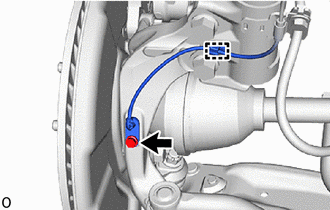
(h) Remove the bolt and front speed sensor from the steering knuckle.
NOTICE:
- Keep the tip of the front speed sensor and installation hole free of foreign matter.
- Do not rotate or apply excessive force to the front speed sensor when removing it from the steering knuckle. Rotating or applying excessive force may result in damage to the front speed sensor.
 Installation
INSTALLATION CAUTION / NOTICE / HINT HINT:
Use the same procedure for the RH side and LH side.
The following procedure is for the LH side.
The front speed sensor rotor is a component of the front axle hub sub-assembly...

Other information:
Toyota Yaris XP210 (2020-2026) Reapir and Service Manual: Components
COMPONENTS ILLUSTRATION *1 CLUTCH START SWITCH ASSEMBLY *2 CLUTCH MASTER CYLINDER PUSH ROD CLEVIS WITH HOLE PIN *3 CLUTCH PEDAL SUPPORT ASSEMBLY *4 NO. 1 INSTRUMENT PANEL UNDER COVER SUB-ASSEMBLY N*m (kgf*cm, ft.*lbf): Specified torque ● Non-reusable part MP grease - - ILLUSTRATION *1 TURN OVER CLUTCH PEDAL SPRING *2 NO...
Toyota Yaris XP210 (2020-2026) Reapir and Service Manual: Components
C..
Categories
- Manuals Home
- Toyota Yaris Owners Manual
- Toyota Yaris Service Manual
- Fuel Gauge
- Engine & Hybrid System
- Adjustment
- New on site
- Most important about car
Fuel Gauge
The fuel gauge shows approximately how much fuel is remaining in the tank when the ignition is switched ON. We recommend keeping the tank over 1/4 full.