Toyota Yaris: Manual Type / Control Switches
Temperature control dial
This dial controls temperature. Turn it clockwise for hot and counterclockwise for cold.
Fan control dial
This dial allows variable fan speeds.
The fan has seven speeds.
Mode selector dial
Turn the mode selector dial to select airflow mode.
A/C switch
Press the A/C switch to turn the air conditioner on. The indicator light on the switch will illuminate when the fan control dial is in any position except OFF.
Air intake selector
This switch controls the source of air entering the vehicle.
Press the air intake selector switch to alternate between the outside air and recirculated air positions.
- Recirculated air position (
 )
)Outside air is shut off. Air within the vehicle is recirculated.
- Outside air position (
 )
)Outside air is allowed to enter the cabin. Use this mode for ventilation or windshield defrosting.
Temperature control dial
When the mode is set to  or
or  with the fan control dial in a position
other than 0 and the temperature control dial in the maximum cold position,
the air intake selector switches to the recirculated air position and the A/C
turns on automatically. If A/C is not desired, press the A/C switch to turn it
off.
with the fan control dial in a position
other than 0 and the temperature control dial in the maximum cold position,
the air intake selector switches to the recirculated air position and the A/C
turns on automatically. If A/C is not desired, press the A/C switch to turn it
off.
Mode selector dial
- The mode selector dial can be set at the intermediate positions (
 )
between each mode. Set the dial to an intermediate position if you want to
split the airflow between the two modes.
)
between each mode. Set the dial to an intermediate position if you want to
split the airflow between the two modes. - For example, when the mode selector dial is at the
 position between
the
position between
the  and
and  positions, airflow from the floor vent is less than that of
the
positions, airflow from the floor vent is less than that of
the  position.
A/C switch
The air conditioner may not function when the outside temperature approaches 32 °F (0 °C).
WARNING
Do not use the recirculated air position in cold or rainy weather
Using the recirculated air position in cold or rainy weather is dangerous as it will cause the windows to fog up. Your vision will be hampered, which could lead to a serious accident.
 Manual Type
..
 Heating
Set the mode selector dial to the
position.
Set the air intake selector to the outside air position.
Set the temperature control dial to the hot position...
Other information:
Toyota Yaris XP210 (2020-2026) Reapir and Service Manual: Camshaft Position Sensor "A" Bank 1 or Single Sensor Circuit Short to Ground (P034011,P034015)
DESCRIPTION The camshaft position sensor (for intake camshaft) (VV1 signal) consists of a magnet and MRE (Magneto-Resistive Element). The intake camshaft has a timing rotor for the camshaft position sensor. When the intake camshaft rotates, changes occur in the air gaps between the timing rotor and MRE, which affects the magnetic field...
Toyota Yaris XP210 (2020-2026) Reapir and Service Manual: Check For Intermittent Problems
CHECK FOR INTERMITTENT PROBLEMS CHECK FOR INTERMITTENT PROBLEMS HINT: A momentary interruption (open circuit) in the connectors and/or wire harness between the sensors and ECUs can be detected using the Data List function of the GTS. (a) Follow the directions on the GTS to display the Data List and select areas where momentary interruption should be monitored...
Categories
- Manuals Home
- Toyota Yaris Owners Manual
- Toyota Yaris Service Manual
- Headlights
- Brake System Control Module "A" System Voltage System Voltage Low (C137BA2)
- How to connect USB port/Auxiliary jack
- New on site
- Most important about car
Refueling
Before refueling, close all the doors, windows, and the liftgate/trunk lid, and switch the ignition OFF.
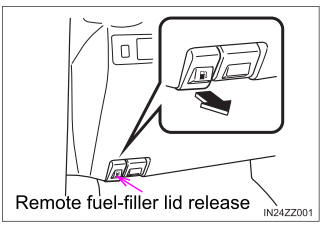
To open the fuel-filler lid, pull the remote fuel-filler lid release.