Toyota Yaris: Lighting (ext) / Back-up Light Assembly
Components
COMPONENTS
ILLUSTRATION
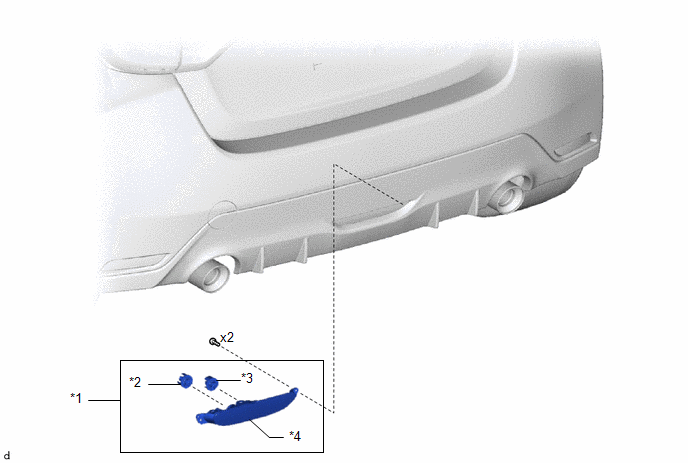
| *1 | BACK-UP LIGHT ASSEMBLY | *2 | BACK-UP LIGHT LED |
| *3 | REAR FOG LIGHT LED | *4 | BACK-UP LIGHT LENS AND BODY |
Removal
REMOVAL
PROCEDURE
1. REMOVE BACK-UP LIGHT ASSEMBLY
| (a) Disengage the clamps and disconnect the 2 connectors. |
|
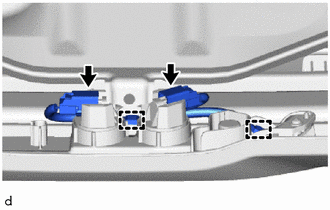
| (b) Remove the 2 screws. |
|
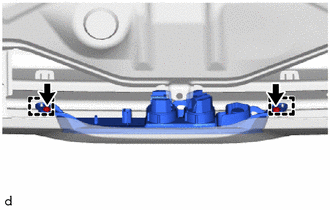
(c) Disengage the guides to remove the back-up light assembly.
Disassembly
DISASSEMBLY
PROCEDURE
1. REMOVE REAR FOG LIGHT LED
(a) Remove the rear fog light LED as shown in the illustration.
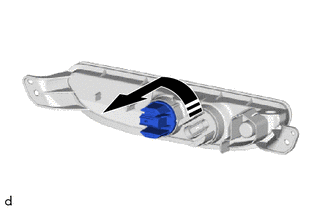
.png) | Remove in this Direction |
2. REMOVE BACK-UP LIGHT LED
(a) Remove the back-up light LED as shown in the illustration.
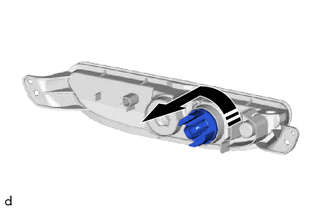
|
| Remove in this Direction |
Inspection
INSPECTION
PROCEDURE
1. INSPECT BACK-UP LIGHT LED
(a) Check that the back-up light LED.
| (1) Apply auxiliary battery voltage to the back-up light LED and check that the light comes on. OK:
If the result is not as specified, replace the back-up light LED. |
|
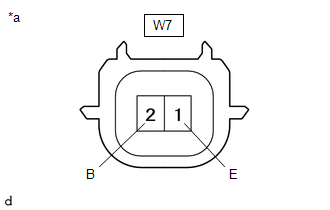
2. INSPECT REAR FOG LIGHT LED
(a) Check that the rear fog light LED.
| (1) Apply auxiliary battery voltage to the rear fog light LED and check that the light comes on. OK:
If the result is not as specified, replace the rear fog light LED. |
|
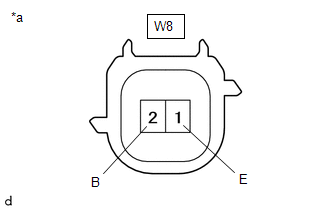
Reassembly
REASSEMBLY
PROCEDURE
1. INSTALL BACK-UP LIGHT LED
(a) Install the back-up light LED as shown in the illustration.
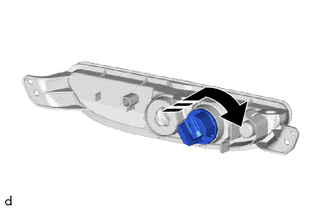
.png) | Install in this Direction |
2. INSTALL REAR FOG LIGHT LED
(a) Install the rear fog light LED as shown in the illustration.
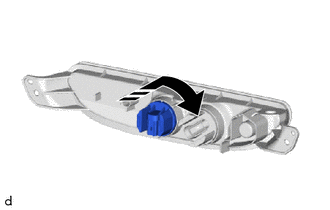
|
| Install in this Direction |
Installation
INSTALLATION
PROCEDURE
1. INSTALL BACK-UP LIGHT ASSEMBLY
| (a) Engage the guides to install the back-up light assembly. |
|
.png)
(b) Install the 2 screws.
| (c) Connect the 2 connectors and engage the clamps. |
|
.png)
 Installation
INSTALLATION PROCEDURE 1. INSTALL AUTOMATIC LIGHT CONTROL SENSOR (a) Engage the claws to install the automatic light control sensor.
2...

Other information:
Toyota Yaris XP210 (2020-2026) Reapir and Service Manual: Charge Air Cooler Temperature Sensor 2 Bank 1 Circuit Short to Ground (P10D311)
DESCRIPTION The intake air temperature sensor, built into the No. 1 turbo pressure sensor, monitors the intake air temperature. The intake air temperature sensor has a built-in thermistor with a resistance that varies according to the temperature of the intake air...
Toyota Yaris XP210 (2020-2026) Reapir and Service Manual: Customize Parameters
CUSTOMIZE PARAMETERS CUSTOMIZE SEAT BELT WARNING SYSTEM NOTICE: When the customer requests a change in a function, first make sure that the function can be customized. Be sure to make a note of the current settings before customizing. When troubleshooting a function, first make sure that the function is set to the default setting...
Categories
- Manuals Home
- Toyota Yaris Owners Manual
- Toyota Yaris Service Manual
- Removal
- Key Battery Replacement
- Engine Start Function When Key Battery is Dead
- New on site
- Most important about car
Fuel Gauge
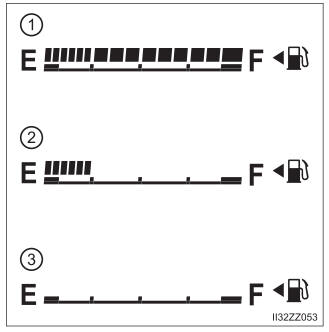
The fuel gauge shows approximately how much fuel is remaining in the tank when the ignition is switched ON. We recommend keeping the tank over 1/4 full.