
Toyota Yaris: Audio Set / Volume/Display/Sound Controls
Commander switch
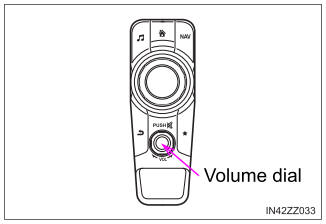
Audio control switch
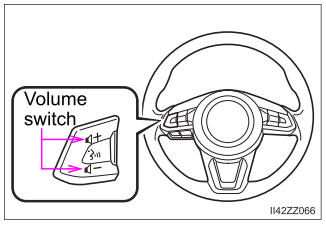
Volume adjustment
Turn the commander switch volume dial. The volume switch on the steering switch can also be pressed.
Press the volume dial to mute and pause. However, while an audio source which cannot be paused such as FM radio is playing, only mute is available. Press the volume dial again to resume the audio.
Display setting
Select the  icon on the home screen and display the Settings
screen.
icon on the home screen and display the Settings
screen.
Select the  tab to select the item you would like to change.
- Display OFF/Clock
The center display can be turned off. Select
 to turn
the display off. When
to turn
the display off. When
 is selected the center
display turns off and the clock is displayed.
is selected the center
display turns off and the clock is displayed.The center display can be turned back on as follows:
- Touch the center display.
- Operate the commander switch.
- Daytime/nighttime (System) screen setting
The daytime or nighttime screen can be selected.
 :
Switches screen automatically according to parking lights
illumination condition* 1
:
Switches screen automatically according to parking lights
illumination condition* 1 :
Daytime screen setting
:
Daytime screen setting :
Nighttime screen setting
:
Nighttime screen setting* 1: The display is constantly on daytime screen when the illumination dim- mer is cancelled.
- Brightness adjustment
Adjust the center display brightness using the slider.
- Contrast adjustment
Adjust the center display contrast using the slider.
- Display setting reset
All of the screen setting values can be reset to their initial settings.
- Select
 .
. - Select
 .
.
- Select
Audio sound adjustment
Select the  icon on the home screen and display the Settings
screen.
icon on the home screen and display the Settings
screen.
Select the  tab to select the item you would like to change.
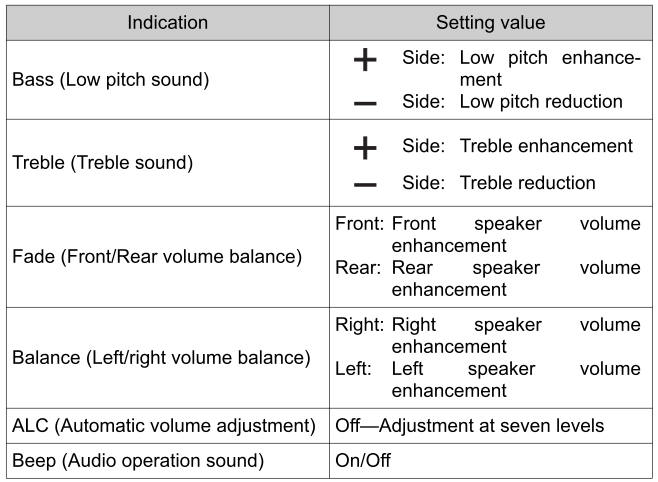
- ALC (Automatic volume adjustment)
The automatic level control (ALC) is a feature that automatically adjusts audio volume according to the vehicle speed. The volume increases in accordance with the increase in vehicle speed, and decreases as vehicle speed decreases.
 Basic Operation Method
TOUCH & TAP
Touch or tap on the item indicated on the screen.
The operation is launched and the next item is
displayed.
SLIDE
Touch the setting item displaying a slider bar...
 Operating the Radio
Radio ON
Select the
icon on the home screen to display the Entertainment screen. When selecting the
desired radio, the following icons
are indicated in the lower part of the center display...
Other information:
Toyota Yaris XP210 (2020-2026) Reapir and Service Manual: Engine Difficult to Start
DESCRIPTION Problem Symptom Suspected Area Trouble Area Engine does not crank Engine cranks slowly Auxiliary battery depletion Starter malfunction Starter system Auxiliary battery depletion Starter malfunction Starter circuit Excessive engine friction Engine Engine assembly Starting time is long Engine speed fluctuation due to abnormal combustion Idle speed too low or high The engine stalls immediately after starting Strong engine vibration due to above symptoms Ignition malfunction Deviation in air fuel ratio (Excessive or insufficient intake air volume or fuel supply) Insufficient compression Changes in load from another system Ignition system Spark plug Ignition coil assembly Fuel system Direct fuel injector assembly Port fuel injector assembly Fuel pump assembly (for high pressure side) Fuel pump (for low pressure side) Fuel pump control circuit Fuel suction plate sub-assembly Fuel main valve assembly Fuel line Purge VSV system Fuel quality (existence of foreign matter, degradation) Intake and exhaust systems Mass air flow meter sub-assembly Intake system (Air leaks or deposit accumulation) Throttle body with motor assembly Air fuel ratio sensor (sensor 1) Air fuel ratio sensor (sensor 2) Cam timing oil control solenoid assembly Variable Valve Timing system (VVT system) Other control systems ECM Wire harness or connector Knock control sensor Engine coolant temperature sensor Immobiliser system Engine Water control valve Engine assembly Crankshaft position sensor High load from another system Air conditioning system Power steering system Electrical load signal system SYMPTOM AND CAUSE OF SYSTEM MALFUNCTION HINT: The following are descriptions of the characteristics of each system malfunction...
Toyota Yaris XP210 (2020-2026) Reapir and Service Manual: Components
COMPONENTS ILLUSTRATION *1 KNOCK SENSOR *2 NO. 1 VENTILATION CASE *3 NO. 2 CYLINDER BLOCK INSULATOR *4 NO. 2 WATER BY-PASS PIPE *5 NO. 6 WATER BY-PASS HOSE *6 NO. 4 WATER BY-PASS HOSE *7 GASKET - - N*m (kgf*cm, ft...
Categories
- Manuals Home
- Toyota Yaris Owners Manual
- Toyota Yaris Service Manual
- Headlights
- Battery Monitor Module General Electrical Failure (P058A01)
- Diagnostic Trouble Code Chart
- New on site
- Most important about car
Break-In Period
No special break-in is necessary, but a few precautions in the first 600 miles (1,000 km) may add to the performance, economy, and life of the vehicle.
Do not race the engine. Do not maintain one constant speed, either slow or fast, for a long period of time. Do not drive constantly at full-throttle or high engine rpm for extended periods of time. Avoid unnecessary hard stops. Avoid full-throttle starts.