
Toyota Yaris: Operating Tips for Audio System / Operating Tips for USB device
Toyota Yaris XP210 (2020-2026) Owner's Manual / Interior Features / Audio System / Operating Tips for Audio System / Operating Tips for USB device
This unit plays audio files as follows:
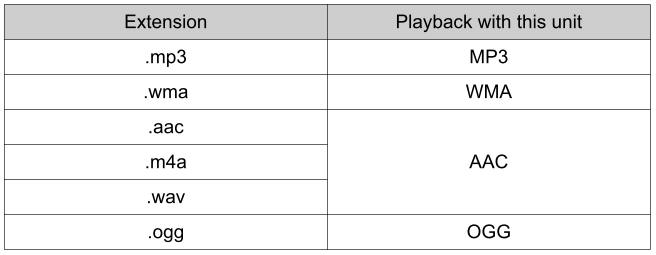
MP3/WMA/AAC/OGG* 1 files written under specifications other than the indicated specification may not play normally or files/folder names may not display correctly.
- Playback may not be possible depending on the type and condition of the USB flash memory even if the audio file complies with the standard above.
- A copyright protected WMA/AAC file cannot be played in this unit.
- The order of the music data stored in the device may differ from the playback order.
- To prevent loss or damage of stored data, we recommend that you always back up your data.
- If the current consumption of the connected device exceeds the following
current value, it may not operate or recharge.
- Apple device is connected: 2,100mA
- Device compatible with BC1.2 is connected: 1,500 mA
- Device other than the above is connected: 500 mA
- Do not pull out the USB device while in the USB mode (only pull it out while in FM/AM radio mode).
- The device will not operate if the data is password protected.
NOTICE
Do not use an audio file extension on files other than audio files. In addition, do not change the audio file extension. Otherwise, the unit will not recognize the file correctly resulting in noise or a malfunction.
 Operating Tips for OGG
OGG is the audio compression format for Xiph. Org Foundation.
Audio data can be created and stored at a higher compression ratio
than MP3.
This unit plays files with the extension (...
 Agreements and disclaimers related to Apple CarPlay™
This unit is compatible with Apple CarPlay™ which can operate an
iPhone® using the vehicle’s audio device.
iPhone, Siri and Apple Music are registered trademarks of Apple
Inc...
Other information:
Toyota Yaris XP210 (2020-2026) Reapir and Service Manual: Data List / Active Test
DATA LIST / ACTIVE TEST DATA LIST NOTICE: In the table below, the values listed under "Normal Condition" are reference values. Do not depend solely on these reference values when deciding whether a part is faulty or not. The steering lock ECU (steering lock actuator or upper bracket assembly) communicates with the GTS through the certification ECU (smart key ECU assembly) which uses CAN communication...
Toyota Yaris XP210 (2020-2026) Reapir and Service Manual: Installation
INSTALLATION PROCEDURE 1. INSTALL COOLER CONDENSER ASSEMBLY (a) Engage the guide to install the cooler condenser assembly. NOTICE: Do not damage the cooler condenser assembly or radiator assembly when installing the cooler condenser assembly. HINT: If a new cooler condenser assembly is installed, add compressor oil to the cooler condenser assembly as follows...
Categories
- Manuals Home
- Toyota Yaris Owners Manual
- Toyota Yaris Service Manual
- Maintenance
- G16e-gts (engine Mechanical)
- Engine & Hybrid System
- New on site
- Most important about car
Liftgate/Trunk Lid
WARNING
Never allow a person to ride in the luggage compartment/trunk
Allowing a person to ride in the luggage compartment/trunk is dangerous. The person in the luggage compartment/trunk could be seriously injured or killed during sudden braking or a collision.
Do not drive with the liftgate/trunk lid open

Copyright © 2026 www.toyaris4.com