Toyota Yaris: Inner Rear View Mirror / Removal
REMOVAL
PROCEDURE
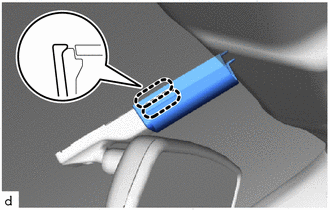
1. REMOVE INNER REAR VIEW MIRROR STAY HOLDER COVER (w/o Pre-collision System)
(a) Slide the inner rear view mirror stay holder cover to disengage the guides as shown in the illustration.
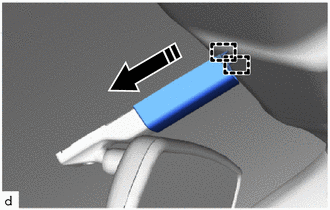
 | Slide in this Direction |
| (b) Disengage the claws to remove the inner rear view mirror stay holder cover. |
|
2. REMOVE NO. 2 FORWARD RECOGNITION COVER (w/ Pre-collision System)
Click here

3. REMOVE NO. 1 FORWARD RECOGNITION COVER (w/ Pre-collision System)
Click here

4. REMOVE INNER REAR VIEW MIRROR ASSEMBLY (w/o Pre-collision System)
(a) Disconnect the connector.
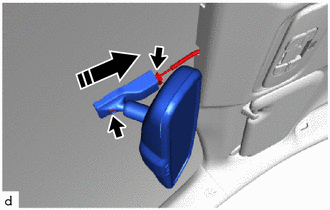
 | Remove in this Direction |
(b) Using a T20 "TORX" socket wrench, remove the screw.
(c) Remove the inner rear view mirror assembly as shown in the illustration.
5. REMOVE INNER REAR VIEW MIRROR ASSEMBLY (w/ Pre-collision System)
(a) Disconnect the connector.
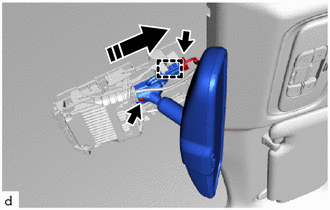
 | Remove in this Direction |
(b) Disengage the clamp.
(c) Using a T20 "TORX" socket wrench, remove the screw.
(d) Remove the inner rear view mirror assembly as shown in the illustration.
 Inspection
INSPECTION PROCEDURE 1. INSPECT INNER REAR VIEW MIRROR ASSEMBLY (a) Inspect the operation of the electrochromic inner rear view mirror assembly.
*a Black Colored Tape *b Forward Sensor *c Bright *d Dark *e Auxiliary Battery *f AUTO Switch *g Component without harness connected (Inner Rear View Mirror Assembly) - - (1) Connect a positive (+) lead from the auxiliary battery to terminal 4 (IG) and a negative (-) lead to terminal 1 (E)...
 Installation
INSTALLATION PROCEDURE 1. INSTALL INNER REAR VIEW MIRROR ASSEMBLY (w/o Pre-collision System) (a) Install the inner rear view mirror assembly as shown in the illustration...
Other information:
Toyota Yaris XP210 (2020-2026) Reapir and Service Manual: Removal
REMOVAL CAUTION / NOTICE / HINT The necessary procedures (adjustment, calibration, initialization, or registration) that must be performed after parts are removed, installed, or replaced during the brake actuator assembly removal/installation are shown below...
Toyota Yaris XP210 (2020-2026) Reapir and Service Manual: Installation
INSTALLATION PROCEDURE 1. INSTALL STUD BOLT (a) Using an E8 "TORX" socket wrench, install the stud bolt to the turbocharger sub-assembly. Torque: 10 N·m {102 kgf·cm, 7 ft·lbf} 2. INSTALL TURBO WATER PIPE GASKET (a) Install the new turbo water pipe gasket to the turbocharger sub-assembly...
Categories
- Manuals Home
- Toyota Yaris Owners Manual
- Toyota Yaris Service Manual
- Adjustment
- Fuse Panel Description
- Opening and Closing the Liftgate/Trunk Lid
- New on site
- Most important about car
Keys
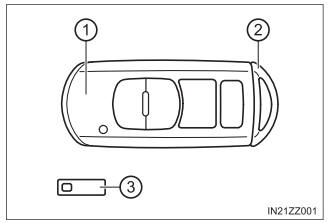
To use the auxiliary key, press the knob and pull out the auxiliary key from the smart key.