Toyota Yaris: Lane Tracing Assist System / Dtc Check / Clear
DTC CHECK / CLEAR
CHECK DTC
(a) Check for DTCs (Test Failed / Pending / Confirmed).
Chassis > Lane Control > Trouble Codes| GTS Display | Description |
|---|---|
| Test Failed | Represent malfunctions that were detected during the current trip. |
| Pending | Represent malfunctions which have occurred since the DTCs were last cleared but have not been confirmed. |
| Confirmed | Represent malfunctions which have occurred since the DTCs were last cleared and have been confirmed. (The number of trips since the DTC was stored may differ for each DTC.) |
HINT:
Freeze frame data is stored respectively for pending DTCs, confirmed DTCs and the latest DTCs.
CLEAR DTC
(a) Clear the DTCs.
Chassis > Lane Control > Clear DTCsHINT:
Clearing the DTCs will also clear the freeze frame data.
 Terminals Of Ecu
TERMINALS OF ECU NOTICE:
DTCs may be output when connectors are disconnected during inspection. Therefore, be sure to clear the DTCs using the GTS once the inspection has been completed...
 Freeze Frame Data
FREEZE FRAME DATA DESCRIPTION (a) Whenever a lane tracing assist system DTC is stored, the forward recognition camera stores the current vehicle state (ECU and sensor information) as Freeze Frame Data...
Other information:
Toyota Yaris XP210 (2020-2026) Reapir and Service Manual: Components
C..
Toyota Yaris XP210 (2020-2026) Owner's Manual: Refueling
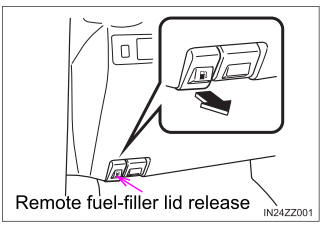
Before refueling, close all the doors, windows, and the liftgate/trunk lid, and switch the ignition OFF. To open the fuel-filler lid, pull the remote fuel-filler lid release. To remove the fuel-filler cap, turn it counterclockwise. Attach the removed cap to the inner side of the fuel-filler lid...
Categories
- Manuals Home
- Toyota Yaris Owners Manual
- Toyota Yaris Service Manual
- G16e-gts (engine Mechanical)
- Fuel Gauge
- How to use USB mode
- New on site
- Most important about car
Refueling
Before refueling, close all the doors, windows, and the liftgate/trunk lid, and switch the ignition OFF.
To open the fuel-filler lid, pull the remote fuel-filler lid release.