
Toyota Yaris: Headup Display System / System Diagram
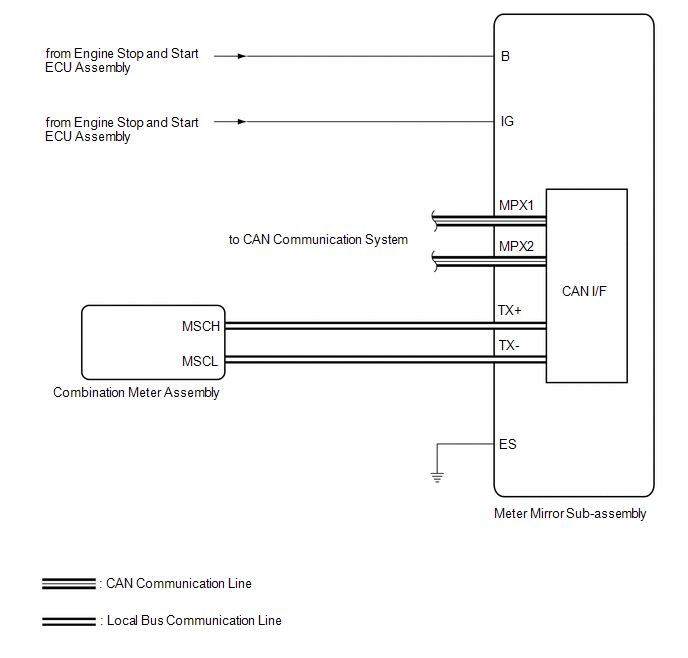
SYSTEM DIAGRAM
HINT:
Refer to System Diagram of CAN Communication System.
Click here

 Parts Location
P..
 How To Proceed With Troubleshooting
CAUTION / NOTICE / HINT HINT:
Use the following procedure to troubleshoot the headup display system.
*: Use the GTS.
PROCEDURE 1. VEHICLE BROUGHT TO WORKSHOP
NEXT
2...
Other information:
Toyota Yaris XP210 (2020-2026) Reapir and Service Manual: Components
COMPONENTS ILLUSTRATION *1 SYMBOL EMBLEM *2 NO. 4 BACK DOOR NAME PLATE *3 NO. 2 BACK DOOR NAME PLATE - - ● Non-reusable part - - ILLUSTRATION *1 NO. 1 BACK DOOR NAME PLATE - - ● Non-reusable part - - ILLUSTRATION *A for LH side *B for RH side *1 NO...
Toyota Yaris XP210 (2020-2026) Reapir and Service Manual: Removal
REMOVAL CAUTION / NOTICE / HINT The necessary procedures (adjustment, calibration, initialization or registration) that must be performed after parts are removed and installed, or replaced during the front door belt moulding removal/installation are shown below...
Categories
- Manuals Home
- Toyota Yaris Owners Manual
- Toyota Yaris Service Manual
- Maintenance
- G16e-gts (engine Mechanical)
- Diagnostic Trouble Code Chart
- New on site
- Most important about car
Turning the Engine Off
Stop the vehicle completely. Manual transaxle: Shift into neutral and set the parking brake.Automatic transaxle: Shift the selector lever to the P position and set the parking brake.
Press the push button start to turn off the engine. The ignition position is off.
Copyright © 2026 www.toyaris4.com