
Toyota Yaris: Meters and Gauges / Outside Temperature Display
Toyota Yaris XP210 (2020-2026) Owner's Manual / When Driving / Combination Meter and Display / Meters and Gauges / Outside Temperature Display
When the ignition is switched ON, the outside temperature is displayed.
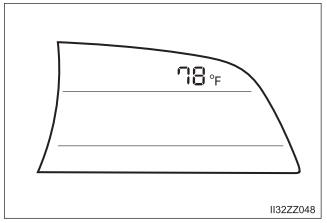
Changing the Temperature Unit of the Outside Temperature Display
The outside temperature unit can be switched between Celsius and Fahrenheit. Settings can be changed by operating the center display screen. Refer to Customizable Features.
- Under the following conditions, the outside temperature display may
differ
from the actual outside temperature depending on the surroundings and
vehicle conditions:
- Significantly cold or hot temperatures.
- Sudden changes in outside temperature.
- The vehicle is parked.
- The vehicle is driven at low speeds.
- When the temperature unit indicated in the outside temperature display is changed, the temperature unit indicated in the engine coolant gauge display changes in conjunction with it.
 Dashboard Illumination
When the position lights are turned on with the ignition switched ON,
the brightness of the instrument panel illumination is dimmed.
When the position lights are turned on, the position lights indicator light
in
the combination meter turns on...
 Trip Computer and INFO Switch
The following information can be selected by pressing the INFO
switch with the ignition switched ON.
Distance-to-empty mode
Average fuel economy mode
Current fuel economy mode
Average vehicle speed
If you have any problems with your trip computer, consult your Toyota
dealer...
Other information:
Toyota Yaris XP210 (2020-2026) Reapir and Service Manual: Removal
REMOVAL CAUTION / NOTICE / HINT HINT: When the cable is disconnected / reconnected to the auxiliary battery terminal, systems temporarily stop operating. However, each system has a function that completes learning the first time the system is used. Learning completes when vehicle is driven Effect/Inoperative Function When Necessary Procedures are not Performed Necessary Procedures Link Lane tracing assist system Drive the vehicle straight ahead at 35 km/h (22 mph) or more for 5 seconds or more...
Toyota Yaris XP210 (2020-2026) Owner's Manual: Load limiter
The load limiting system releases belt webbing in a controlled manner to reduce belt force on the occupant’s chest. While the most severe load on a seat belt occurs in frontal collisions, the load limiter has an automatic mechanical function and can activate in any accident mode with sufficient occupant movement...
Categories
- Manuals Home
- Toyota Yaris Owners Manual
- Toyota Yaris Service Manual
- Engine & Hybrid System
- Fuel Gauge
- Adjustment
- New on site
- Most important about car
Keys
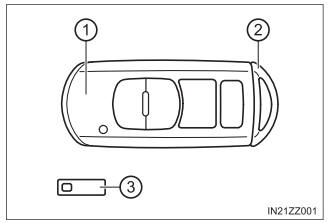
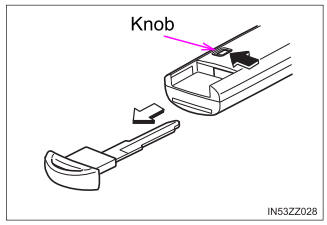
To use the auxiliary key, press the knob and pull out the auxiliary key from the smart key.

Copyright © 2026 www.toyaris4.com