
Toyota Yaris: Power Mirror Control System / Customize Parameters
Toyota Yaris XP210 (2020-2026) Reapir and Service Manual / Vehicle Exterior / Mirror (ext) / Power Mirror Control System / Customize Parameters
CUSTOMIZE PARAMETERS
CUSTOMIZE POWER MIRROR CONTROL SYSTEM
NOTICE:
- When the customer requests a change in a function, first make sure that the function can be customized.
- Record the current settings before customizing.
HINT:
The following items can be customized.
(a) Customizing with the GTS
(1) Select the setting by referring to the table below.
Others| Tester Display | Description | Default | Setting | ECU |
|---|---|---|---|---|
| Automatic Mirror Fold Setting | Function that changes the condition under which the outer mirrors automatically retract | Door Lock | $01:ACC,$02:Door Lock,$03:Disable | Main body ECU (Multiplex network body ECU) |
 Operation Check
OPERATION CHECK CHECK ELECTRICAL REMOTE CONTROL MIRROR FUNCTION (a) Turn the ignition switch to ON. (b) With L on the mirror select and surface adjust switch selected, check that the outer rear view mirror assembly LH surface moves up, down, left and right normally...
 Problem Symptoms Table
PROBLEM SYMPTOMS TABLE NOTICE: If the auxiliary battery voltage becomes low, auxiliary battery load control will operate in order to ensure sufficient power is supplied to the power steering system...
Other information:
Toyota Yaris XP210 (2020-2026) Owner's Manual: Engine Coolant
Inspecting Coolant Level Inspect the antifreeze protection and coolant level in the coolant reservoir at least once a year—at the beginning of the winter season—and before traveling where temperatures may drop below freezing. Inspect the condition and connections of all cooling system and heater hoses...
Toyota Yaris XP210 (2020-2026) Reapir and Service Manual: Components
COMPONENTS ILLUSTRATION *A for Intake Side *B for Exhaust Side *1 CAMSHAFT POSITION SENSOR *2 IGNITION COIL ASSEMBLY *3 ENGINE WIRE *4 O-RING Tightening torque for "Major areas involving basic vehicle performance such as moving/turning/stopping" : N*m (kgf*cm, ft...
Categories
- Manuals Home
- Toyota Yaris Owners Manual
- Toyota Yaris Service Manual
- Engine Start Function When Key Battery is Dead
- Power Integration No.1 System Missing Message (B235287,B235587,B235787-B235987)
- Diagnostic Trouble Code Chart
- New on site
- Most important about car
Keys
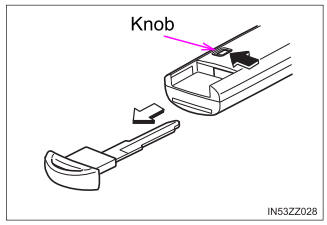
To use the auxiliary key, press the knob and pull out the auxiliary key from the smart key.

Copyright © 2026 www.toyaris4.com