Toyota Yaris: Power Window Control System / Check For Intermittent Problems
CHECK FOR INTERMITTENT PROBLEMS
NOTICE:
- If the vehicle or vehicle controls are operated (for example, during initial inspection when the vehicle is brought in for repair) before Vehicle Control History (RoB) has been collected, the past Vehicle Control History (RoB) information could be lost.
- The function "Read Vehicle Control History (RoB)" uses the current system time setting inside the GTS and the time counter inside the controlling ECU to calculate the timings shown in the Vehicle Control History (RoB). For this reason, before reading out the Vehicle Control History (RoB), first make sure that the GTS system clock is accurately set to the current time.
- Due to the characteristics of the time counter inside the controlling ECU, the value may be off by up to 10%.
- Due to its characteristics, the time counter inside the controlling ECU is retroactively reset approximately 34 days before the current time point. For this reason, time information recorded 34 days or more before the current time point may not be accurately displayed.
HINT:
The main body ECU (multiplex network body ECU) stores Vehicle Control History (RoB) for the power window system, which can be read using the GTS.
VEHICLE CONTROL HISTORY (RoB)
(a) Check the Vehicle Control History (RoB) according to the display on the GTS.
Body Electrical > Main Body > Utility| Tester Display |
|---|
| Vehicle Control History (RoB) |
| Code | Item | Item Description | Note |
|---|---|---|---|
| X2306 | Power Window Operation | Memorize the factors when the power window operated | Memorize operating means for power window operation |
| X2307 | Power Window Status | Memorize power window operation history | Memorize if any window opens and closes while the ignition switch is off |
| Operation History List |
|---|
| Window Close by Door Key Operation |
| Window Close by Wireless Operation |
| Window Close by Accessory Operation |
| Window Close by Auto Entry Operation |
| Window Close by IG OFF Linked Function |
| Window Close by Wiper Linked Function |
| Window Close by High Speed Linked Function |
| Window Close by Tunnel Approach Function |
| Window Close by Voice |
| Window Open by Door Key Operation |
| Window Open by Wireless Operation |
| Window Open by Accessory Operation |
| Window Close by Escapes from Tunnel Function |
| Window Open by Voice |
HINT:
Some items are not displayed depending on the vehicle.
SYMPTOM SIMULATION
Click here
.gif)
 How To Proceed With Troubleshooting
CAUTION / NOTICE / HINT HINT:
Use the following procedure to troubleshoot the power window control system.
*: Use the GTS.
PROCEDURE 1. VEHICLE BROUGHT TO WORKSHOP
NEXT
2...
 Operation Check
OPERATION CHECK CHECK WINDOW LOCK FUNCTION HINT: Before performing the window lock switch operation check, make sure that the window lock switch is off (the switch is not pushed in)...
Other information:
Toyota Yaris XP210 (2020-2026) Reapir and Service Manual: Precaution
PRECAUTION MAINTENANCE PRECAUTION (a) If the turbocharger sub-assembly is found to be defective, it must be replaced. Make sure to identify the cause of the problem including the conditions under which the turbocharger sub-assembly was used. Repair or replace the following as necessary: (1) Engine oil (level and quality) (2) Oil lines leading to the turbocharger sub-assembly (b) Be careful when removing and reinstalling the turbocharger sub-assembly...
Toyota Yaris XP210 (2020-2026) Reapir and Service Manual: How To Proceed With Troubleshooting
CAUTION / NOTICE / HINT HINT: Use these procedures to troubleshoot the CXPI communication system. *: Use the GTS. PROCEDURE 1. VEHICLE BROUGHT TO WORKSHOP NEXT 2. INSPECT AUXILIARY BATTERY VOLTAGE (a) Measure the auxiliary battery voltage with the ignition switch off...
Categories
- Manuals Home
- Toyota Yaris Owners Manual
- Toyota Yaris Service Manual
- Opening and Closing the Liftgate/Trunk Lid
- Engine & Hybrid System
- Auto Lock/Unlock Function
- New on site
- Most important about car
Keys
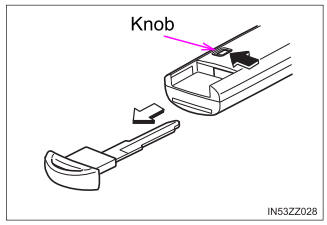
To use the auxiliary key, press the knob and pull out the auxiliary key from the smart key.